|
|
Home
Analysis
Manual
About CIRA
Publications
Legal Notice
Contact
فارسی
|
|
|
Graphical user manual of CIRA
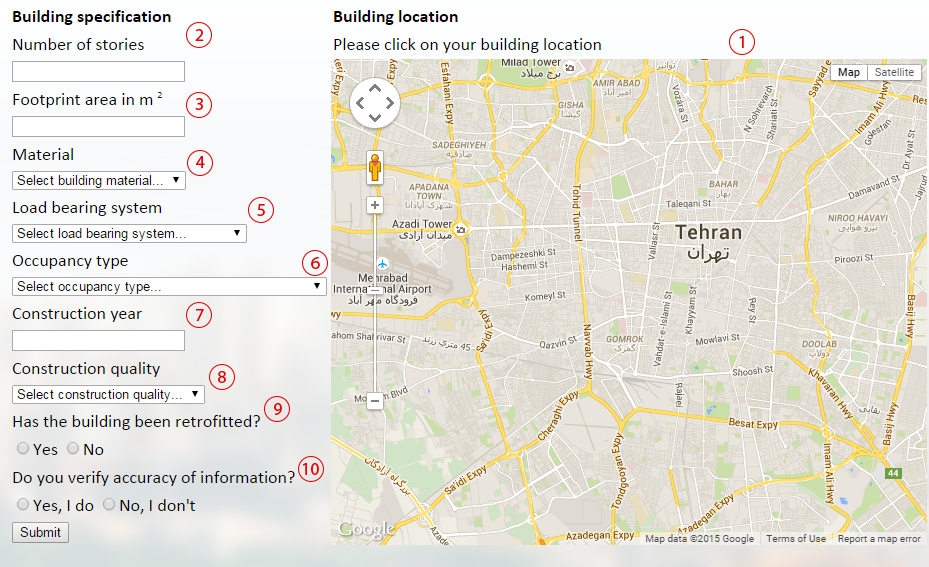
-
Click on your building location and let the CIRA detects it's geographical coordinates using ®Google Map.
Please note that you do not need to find your building exactly. Clicking anywhere of it's vicinity is satisfactory.
-
Enter the number of stories above ground in your building.
Please do not take into account the underground stories.
-
Enter the footprint area of your building, not only the unit you are living in if you're living ib a multi-family dwelling building.
-
Select the material type of your bulding structure.
CIRA does not care about other containing materials in your building, like floors, staris, partition walls ane etc.
-
Select the load bearing system of your structure from the drop down list items..
-
Choose the occupancy type of your building from the list.
-
Enter the year your building has been costructed in Solar Hijri 4 digit format.
-
If you are informed of the quality of your building construction, please choose one of "Superior", "Ordinary" and "Inferor".
This quality can include the quality of design, construction, material ane etc.
-
If your building has been retrofitted, please select yes. If not, please select no.
If you do not know about it or are not sure, please leave this item empty.
-
If you have inputted all the information accurately, choose "Yes, I'm sure" and verify your information.
CIRA will use the results of your building type to inform other people and official decision makers about the earthquake hazard.
If you are not sure about the accuracy of data, we strongly ask you to choose "No, I'm not sure".
|
|
